We are excited to introduce native UEFI firmware analysis support in IDA 9.5! Firmware is a prime target for persistent malware and a fertile hunting ground for vulnerabilities. It is also one of the most challenging environments in which to understand what code is actually doing.
If you've reverse-engineered the UEFI - Unified Extensible Firmware Interface - architecture before, you know the drill. First, you extract the PE32 sections from the firmware image using an external tool. Then, you load the drivers into IDA one by one, only to find that IDA treats each of them like an ordinary PE file: the boot services pointer is an anonymous qword, protocol GUIDs appear as 16 raw bytes, and calls into other modules are represented as offsets into tables you have to decipher manually. Before you can even begin investigating the interesting parts of the code, you've already spent considerable time reconstructing the context needed to make sense of it.
Over the years, some of the most advanced cybersecurity research teams have developed and generously shared powerful IDA plugins for firmware analysis, such as efiXplorer. These community contributions have helped bridge the gap between IDA's out-of-the-box capabilities and the specialized needs of firmware researchers.
Inspired by the pioneering work of Alex Matrosov, Yegor Vasilenko, and the broader REHints team, as well as other outstanding community projects, IDA 9.5 now takes care of much of that firmware analysis groundwork for you!
Simply open a complete firmware image, such as an SPI flash dump or a firmware update package, and IDA automatically loads its constituent modules. It identifies boot services, runtime services, and SMM tables, resolves protocol GUIDs into meaningful names, and applies types to the interfaces that drivers install and consume.
The result? Pseudocode that looks remarkably close to the original EDK2 source code:
v7 = DiskIoDxe_gBS->LocateProtocol(
       &DiskIoDxe_gEfiDevicePathUtilitiesProtocolGuid,
       nullptr,
       (void **)&DiskIoDxe_gEfiDevicePathUtilitiesProtocol);
Firmware loader: one image, one database
The new loader opens a firmware image into a single database. No more extracting individual PE32 sections with an external tool first. Built on UEFITool, the loader walks the firmware volumes, unpacks the compressed ones, and maps each PE or TE module at its own address.
To keep hundreds of modules manageable, the Functions window groups the code into <module kind>/<module> folders, such as DXE_DRIVER/DiskIoDxe.
Two load formats, for two address sizes. Firmware images often mix 64-bit DXE drivers with 32-bit PEI modules, while a database has a single address size. The loader therefore offers two formats: the default 64-bit load, and "UEFI firmware image, 32-bit modules" for IA32 PEI code. AArch64 images are supported as well.
Single modules work too. If you only need one driver, open the .efi file with the PE loader. It gets the same analysis described below.
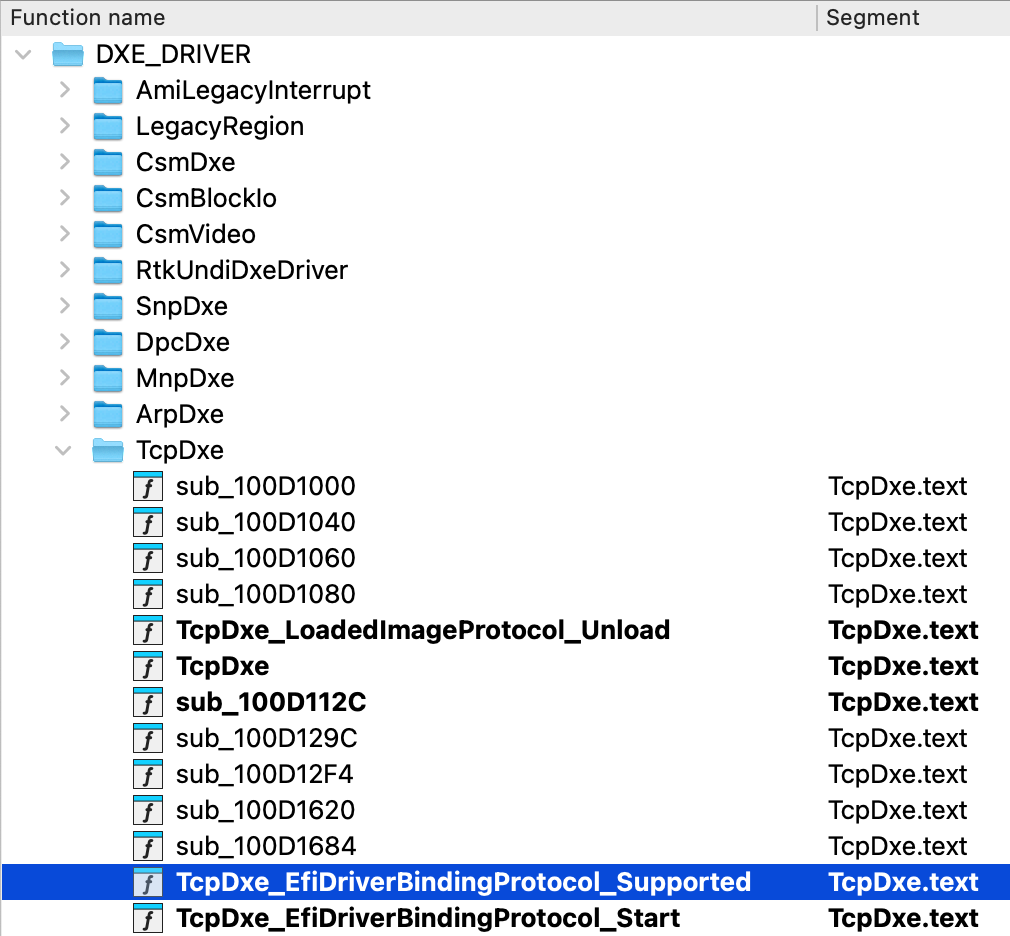
Function tree on a loaded firmware, showing grouping by modules
gBS, gRT and gST, resolved for you
In almost every DXE module, the entry point receives ImageHandle and SystemTable, then copies the boot services and runtime services pointers into globals. Every later call goes through those globals. IDA now follows these values from the entry point and through the functions it calls, then names and types the globals after EDK2 conventions: gImageHandle, gST, gBS and gRT.
Here's the entry point of OVMF's DiskIoDxe without the UEFI analysis (ASSERT checks left out):
EFI_STATUS __fastcall DiskIoDxe(EFI_HANDLE ImageHandle, EFI_SYSTEM_TABLE *SystemTable)
{
  ...
  qword_100061B0 = (__int64)SystemTable;
  qword_100061C8 = (__int64)SystemTable->BootServices;
  qword_100061A0 = (__int64)SystemTable->RuntimeServices;
  v5 = (*(__int64 (__fastcall **)(void *, _QWORD, __int64 *))(qword_100061C8 + 320))(
         &unk_10006000, 0, &qword_100061A8);
  ...
  qword_10006080 = (__int64)ImageHandle;
  qword_10006088 = (__int64)ImageHandle;
  v6 = (*(__int64 (__fastcall **)(__int64 *, void *, __int64 (__fastcall **)(), void *, __int64 (__fastcall **)(), void *, __int64 (__fastcall **)(), _QWORD))(qword_100061C8 + 328))(
         &qword_10006088,
         &unk_10006030,
         off_10006060,
         &unk_10006010,
         off_10006180,
         &unk_10006020,
         off_10006040,
         0);
  ...
}
And the same function in IDA 9.5:
EFI_STATUS __fastcall DiskIoDxe(EFI_HANDLE ImageHandle, EFI_SYSTEM_TABLE *SystemTable)
{
  ...
  DiskIoDxe_gST = SystemTable;
  DiskIoDxe_gBS = SystemTable->BootServices;
  DiskIoDxe_gRT = SystemTable->RuntimeServices;
  v7 = DiskIoDxe_gBS->LocateProtocol(
         &DiskIoDxe_gEfiDevicePathUtilitiesProtocolGuid,
         nullptr,
         (void **)&DiskIoDxe_gEfiDevicePathUtilitiesProtocol);
  ...
  DiskIoDxe_mEfiDriverBindingProtocol.ImageHandle = ImageHandle;
  DiskIoDxe_mEfiDriverBindingProtocol.DriverBindingHandle = ImageHandle;
  v11 = DiskIoDxe_gBS->InstallMultipleProtocolInterfaces(
          &DiskIoDxe_mEfiDriverBindingProtocol.DriverBindingHandle,
          &DiskIoDxe_gEfiDriverBindingProtocolGuid,
          &DiskIoDxe_mEfiDriverBindingProtocol,
          &DiskIoDxe_gEfiComponentNameProtocolGuid,
          &DiskIoDxe_mEfiComponentNameProtocol,
          &DiskIoDxe_gEfiComponentName2ProtocolGuid,
          &DiskIoDxe_mEfiComponentName2Protocol,
          0);
  ...
}
The offsets + 320 and + 328 are now LocateProtocol and InstallMultipleProtocolInterfaces, and the anonymous globals carry their real names.
Every module keeps its own names. In a firmware image, each module has its own copy of these globals, so IDA prefixes them with the module name: DiskIoDxe_gBS, PartitionDxe_gBS. The ASSERT helpers are recognized as well and show up as DebugAssert with typed arguments.
Tables found by usage. Not every module gets its tables from the entry point. The DXE core builds them itself, and SMM drivers receive gSmst through a protocol. For these cases, IDA infers the type of an untyped global from the calls made through it: if every call lands on a function-pointer member of EFI_BOOT_SERVICES, the global is gBS. The same check identifies the SMM system table. This approach is similar to the one taken by the efiXplorer plugin.
Protocols get names and types
UEFI modules talk to each other through protocols: a GUID paired with a table of function pointers or other data. Once IDA knows gBS, it looks for calls to LocateProtocol, HandleProtocol, OpenProtocol and the Install*ProtocolInterface family, and applies four things to each of them.
- GUIDs are named. IDA ships a database of about 15,000 known GUIDs, built from the community guiddb project and UEFITool's GUID list. A matching
EFI_GUIDin the module is typed and named, for examplegEfiPcdProtocolGuid. This also works for GUIDs that the code builds on the stack. - Interfaces are typed. The pointer that
LocateProtocolwrites back becomes a typed pointer to the protocol struct. If it lands in a global, the global is named after the protocol, for examplegPcdProtocol. Calls through it then readgPcdProtocol->Get32(...)instead of an offset. - Implementation functions are named. When a driver installs an interface, IDA types the struct in
.dataand names the functions in it after the members they implement. - Structures are synthesized for unknown protocols. Vendor protocols that are missing from the public headers get a struct synthesized from the slots that the installing driver fills. These structs are marked as synthesized: member names are generic and member types are guesses, but every call site of the same member now points to the same field.
The same applies to SMM: gSmst services and the SMM protocols located through it are typed the same way.
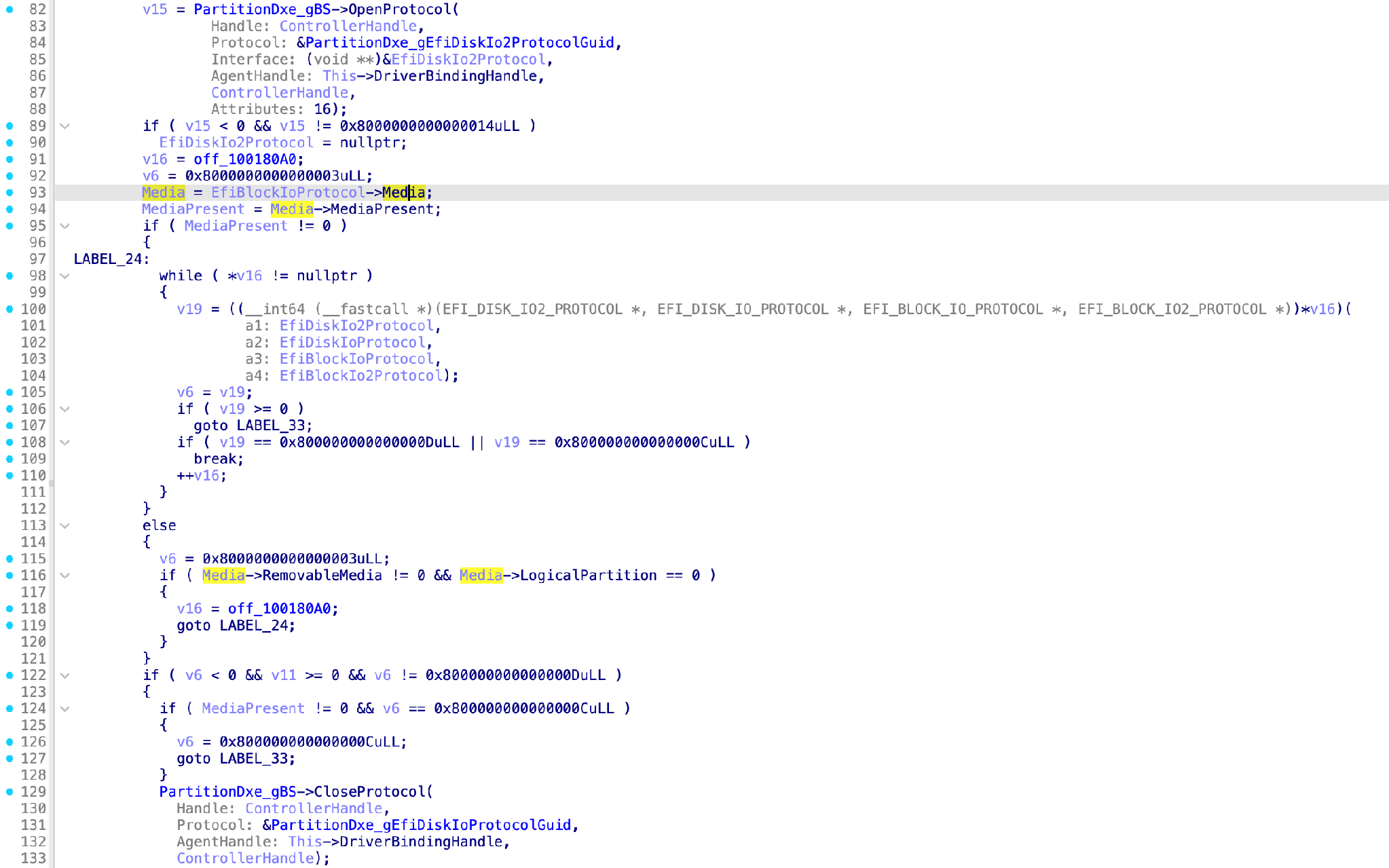
IDA resolved the GUID and types the stack variable to the correct protocol based on the OpenProtocol call
Follow protocols across modules
A protocol call is an indirect call into another module, and static analysis usually stops following the code there. IDA 9.5 records every installed interface and every call made through a protocol member. After all modules are analyzed, it links the two.
- Jump to the implementation. Double-click
DiskIo->ReadDiskin a consumer's pseudocode to land in theReadDiskfunction of DiskIoDxe. When several drivers install the same protocol, IDA lets you choose. - Find every caller. Each member call is also a code cross-reference to its implementations. Press X on
ReadDiskto list the call sites across all modules. From pseudocode, the context menu lists the call sites of the member under the cursor. - See every protocol event at a glance. The new UEFI protocols window lists every install, uninstall, locate and notify event in the image, with the module, the GUID and the service used. To focus on installations only, use the filter in the right-click menu.
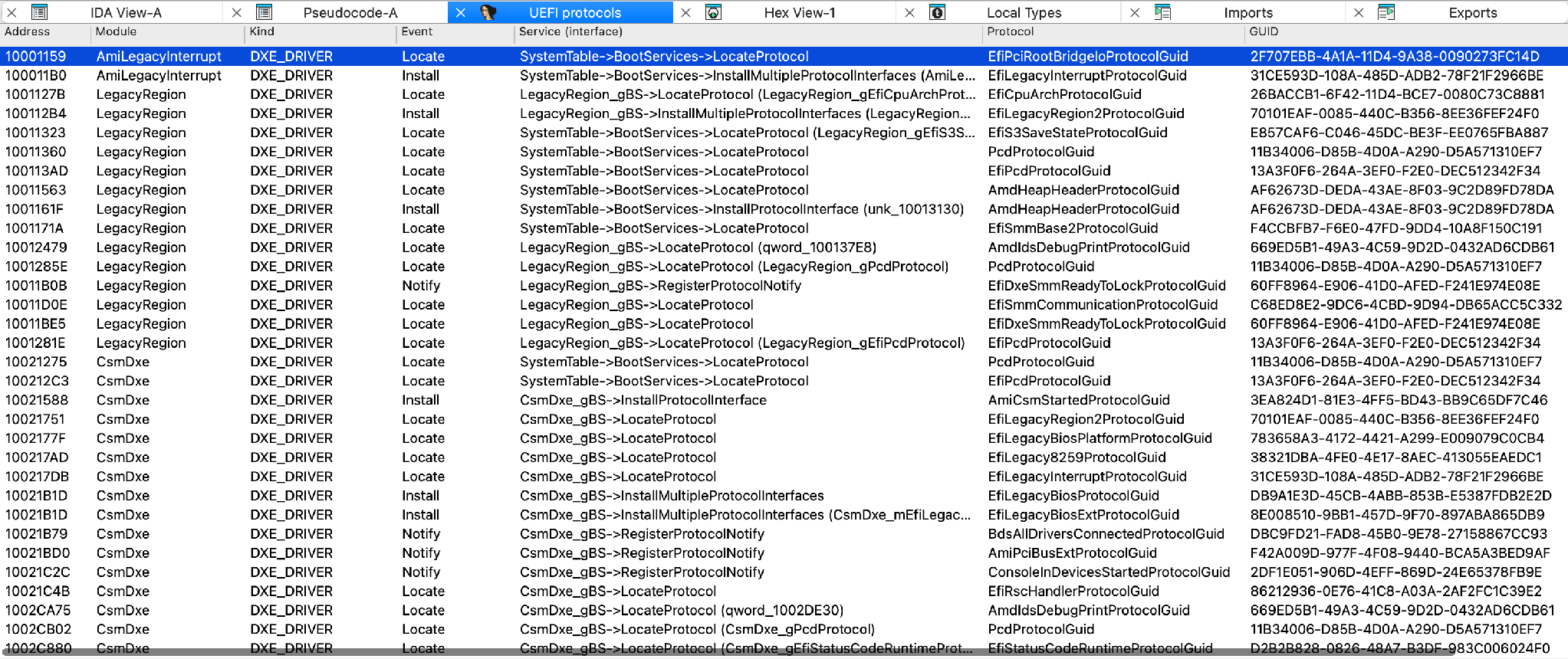
Preview of the "UEFI protocols" window, showing protocol installations and usages
PEI support: the early boot phase, too
The Pre-EFI Initialization (PEI) phase runs early in boot, often in 32-bit mode, and it works differently from DXE. Instead of a global gBS, a PEIM receives an EFI_PEI_SERVICES ** and calls through it: (*PeiServices)->LocatePpi(...). Instead of protocols, it uses PPIs.
IDA handles PEI with the same machinery as DXE:
- The services pointer is tracked from the entry point, and through the
GetPeiServicesTablePointergetters that fetch it from where the PEI core keeps it: the slot below the IDT base on x86, and theTPIDR_EL0register on ARM. Getters that vendors inline are recognized too. - PPI GUIDs are named, and the interfaces returned by
LocatePpiare typed, just like protocols. - Descriptor lists are typed. The
EFI_PEI_PPI_DESCRIPTORand notify descriptor arrays passed toInstallPpiandNotifyPpiget their types and named GUIDs. Each notify callback gets theEFI_PEIM_NOTIFY_ENTRY_POINTprototype, with itsPpiparameter typed as the PPI it waits for, and is then analyzed in turn. - Library wrappers are recognized. Calls through
PeiServicesLocatePpiand similar helpers count the same as direct service calls.
PPI events show up in the same UEFI protocols window, next to the DXE protocols.
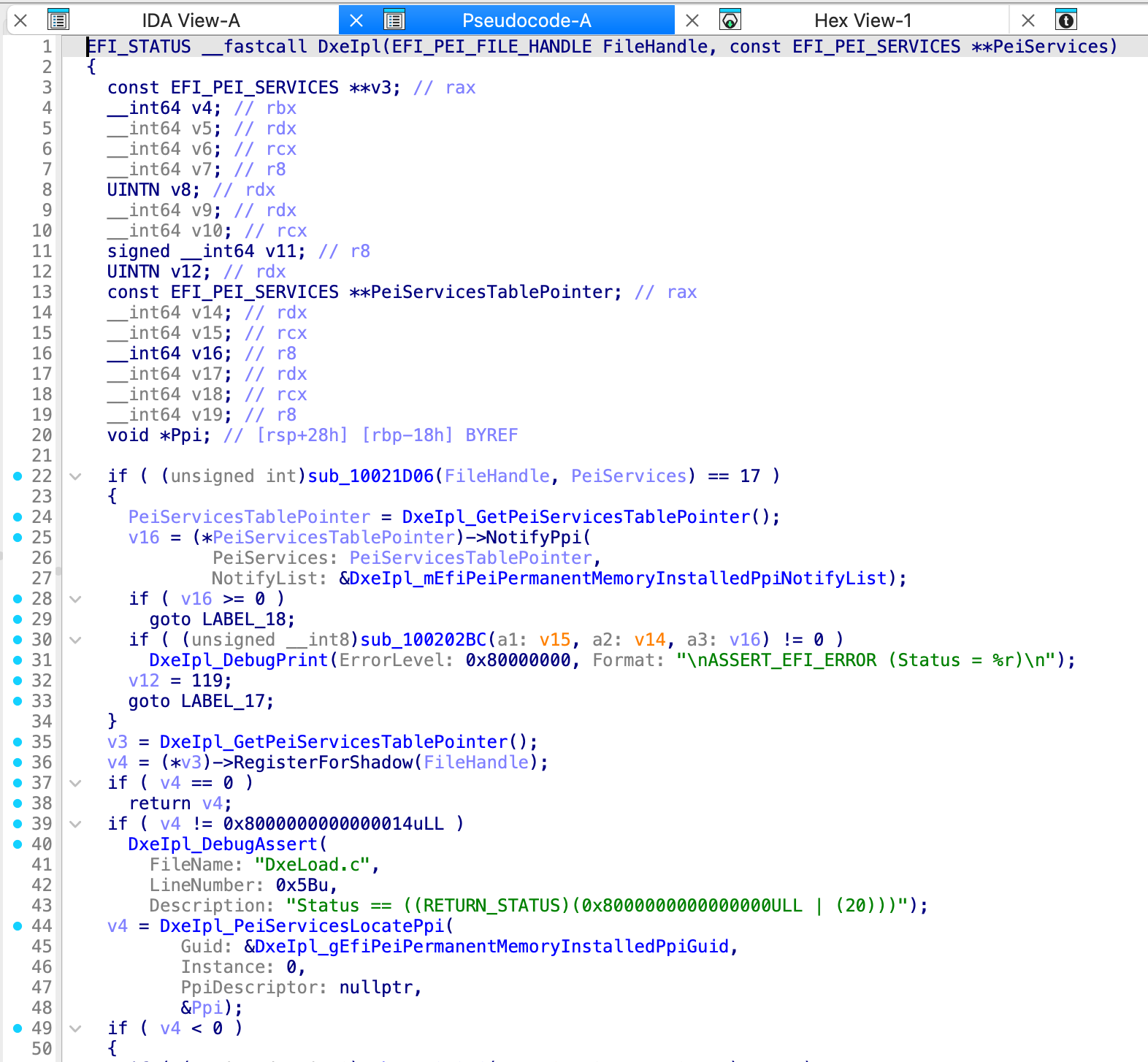
Preview of the PEIM entry point with typed LocatePpi and a notify list
Scripting the results
Everything IDA finds is available to your plugins, scripts, and AI agents. The C++ API lives in uefi.h in the SDK, and the Python bindings are in the ida_uefi module.
This script lists every protocol installation in the image, then the implementations and callers of a specific protocol member:
import ida_uefi, ida_name

svc = ida_uefi.get_uefi_svc()
mods = svc.get_modules()

for p in svc.get_protocols():
    if p.kind == ida_uefi.UEFI_PK_INSTALL:
        mod = mods[p.module].name if p.module >= 0 else "?"
        print(f"{p.call_ea:x} [{mod}] {p.name or p.guid}")

off = svc.get_member_offset("EFI_DISK_IO_PROTOCOL", "ReadDisk")
for impl in svc.get_member_impls("EFI_DISK_IO_PROTOCOL", off):
    print("implemented by", ida_name.get_name(impl.func))
for ea in svc.get_member_calls("EFI_DISK_IO_PROTOCOL", off):
    print("called at", hex(ea))
The service also gives you the module table, the installed interfaces, the struct bound to each GUID (which you can change), and lookups in the GUID database in both directions. The full sample ships with IDA as examples/disassembler/uefi_query.py, and help(svc) lists every method.
Limits and options
A few things to know before you start:
- It needs the decompiler. The analysis runs on Hex-Rays microcode, so the decompiler for your target architecture needs to be available.
- One address size per database. To decompile 32-bit modules, load the image with the 32-bit format.
- Big images take time. A retail desktop board image with over 400 DXE and SMM modules takes about nine minutes to analyze on an M4 MacBook Pro. We plan to add options to skip parts of the analysis in future updates.
- Some results are inferences. A
gSmstfound by usage can rest on a single call, and synthesized structs have guessed member types. Both are marked as such, and your own types always take precedence.
Each part of the analysis can be switched off in cfg/uefi.cfg:
| Option | Controls |
|---|---|
| UEFI_RENAME | EDK2 names for tables, GUIDs, protocols and their implementations (types apply regardless) |
| UEFI_INFER_TABLES | Table types inferred from usage |
| UEFI_TYPE_PROTOCOLS | GUID naming, protocol and PPI typing |
| UEFI_CONST_STRINGS | Inline string literals from writable .data |
| UEFI_FUNC_FOLDERS | Per-module folders in the Functions window |
| UEFI_MAX_DEPTH, UEFI_MAX_FUNCS | How far the analysis follows calls, and how many functions it analyzes per module (default 4 and 1,000) |
In next version of IDA we plan to expand the built-in UEFI functionality:
- Improve ARM64 UEFI support: analysis of standalone modules and recognition of the inlined PEI services table getter
- Improve the performance
- Expose additional information to the API
- Auto-detect standalone PEI modules
- Improve analysis related to event and SMI handlers
Getting started
UEFI support ships in IDA 9.5, with nothing extra to install. Open a firmware dump of your own and let IDA do the groundwork.
If it misses a protocol or names something wrong, send to support@hex-rays.com the module. Firmware varies a lot between vendors, and real samples are what improve the analysis.
Special thanks!
A word of thanks to the open-source projects this work builds on. The firmware parser is based on UEFITool by Nikolaj Schlej and LongSoft, which in turn includes the EFI/Tiano decompression library (Intel, Apple and LongSoft), Intel's LZMA decompression wrapper, Igor Pavlov's LZMA SDK, the SM3 digest from Huawei Technologies, Paul Hsieh's bstrlib, the Brotli decoder and the Kaitai Struct C++ runtime. The GUID database builds on REhints' guiddb.
And many thanks to efiXplorer for trailblazing UEFI support in IDA.
Last but not least, a special thank you to our teammate Paweł Pawłowski for spearheading the development of UEFI support in IDA 9.5.
One firmware image, one database, and protocols you can follow from caller to implementation. We hope you enjoy it!


